제품 미리보기
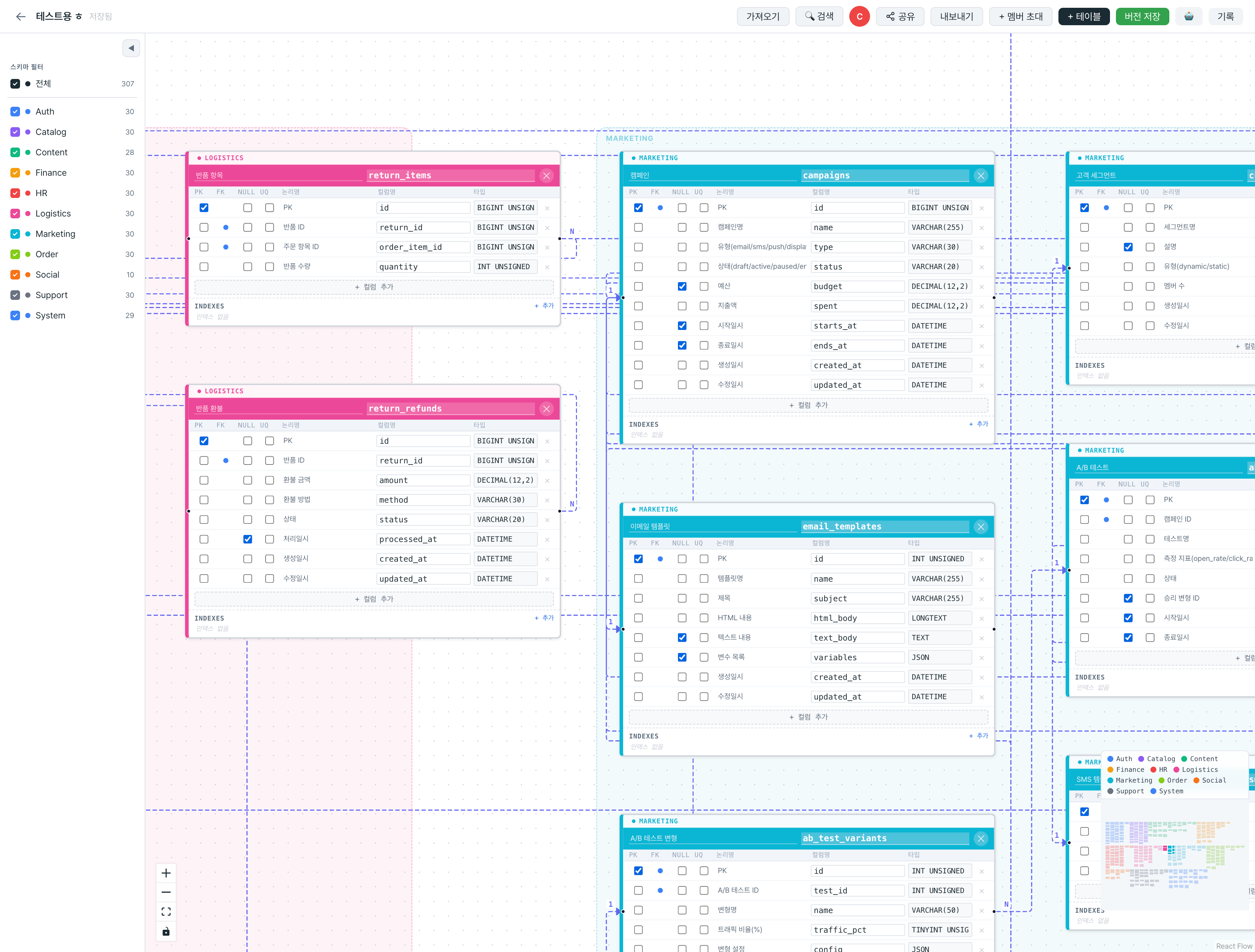
실제 ERDify 에디터
스키마별 색상 분류, 논리명·컬럼명·타입 한눈에, 관계선으로 FK 연결.
사용하는 AI 도구에서 ERDify MCP를 연결하세요.
스키마 설계부터 DDL·ORM 생성, 팀 실시간 협업까지 — AI와 함께 일하는 데이터베이스 도구.
MCP(Model Context Protocol)로 AI와 연결하세요.
스키마 조회부터 수정, 팀 동기화까지 AI와 함께 진행합니다.
orders, order_items 테이블과 users와의 관계를 추가하겠습니다.
연결된 AI가 현재 ERD 전체를 읽어 테이블, 컬럼, 관계, 타입을 정확히 파악합니다.
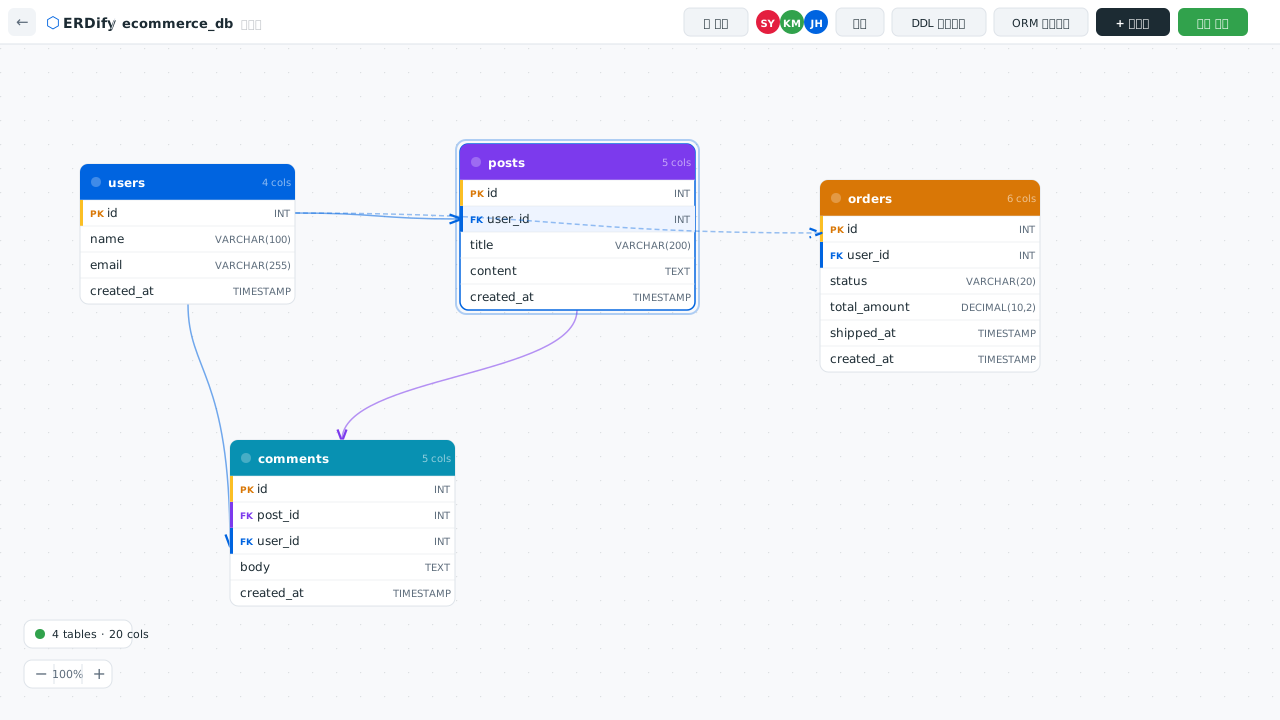
테이블 추가, 컬럼 변경, FK 설정을 대화하듯 요청하면 ERD에 즉시 반영됩니다.
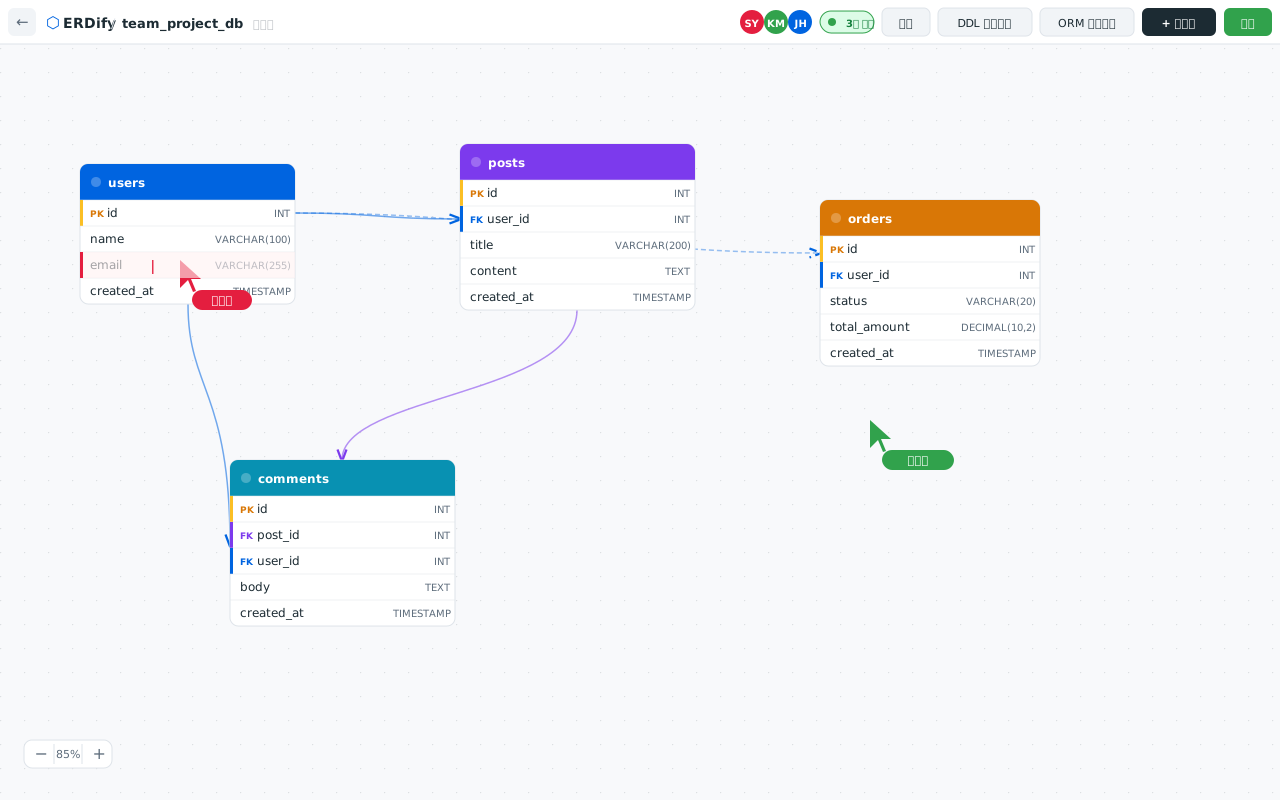
AI와 함께 수정한 내용이 모든 팀원의 화면에 실시간으로 반영됩니다.
스키마별 색상 분류, 논리명·컬럼명·타입 한눈에, 관계선으로 FK 연결.
설계부터 개발까지, 데이터베이스 워크플로우 전체를 커버합니다.
AI가 MCP로 ERD를 읽고, 여러분의 지시에 따라 함께 수정합니다. 자연어 한 마디로 테이블·관계·컬럼을 설계하세요.
팀원과 동시에 ERD를 편집하세요. 커서 위치, 변경 사항이 실시간으로 반영됩니다.
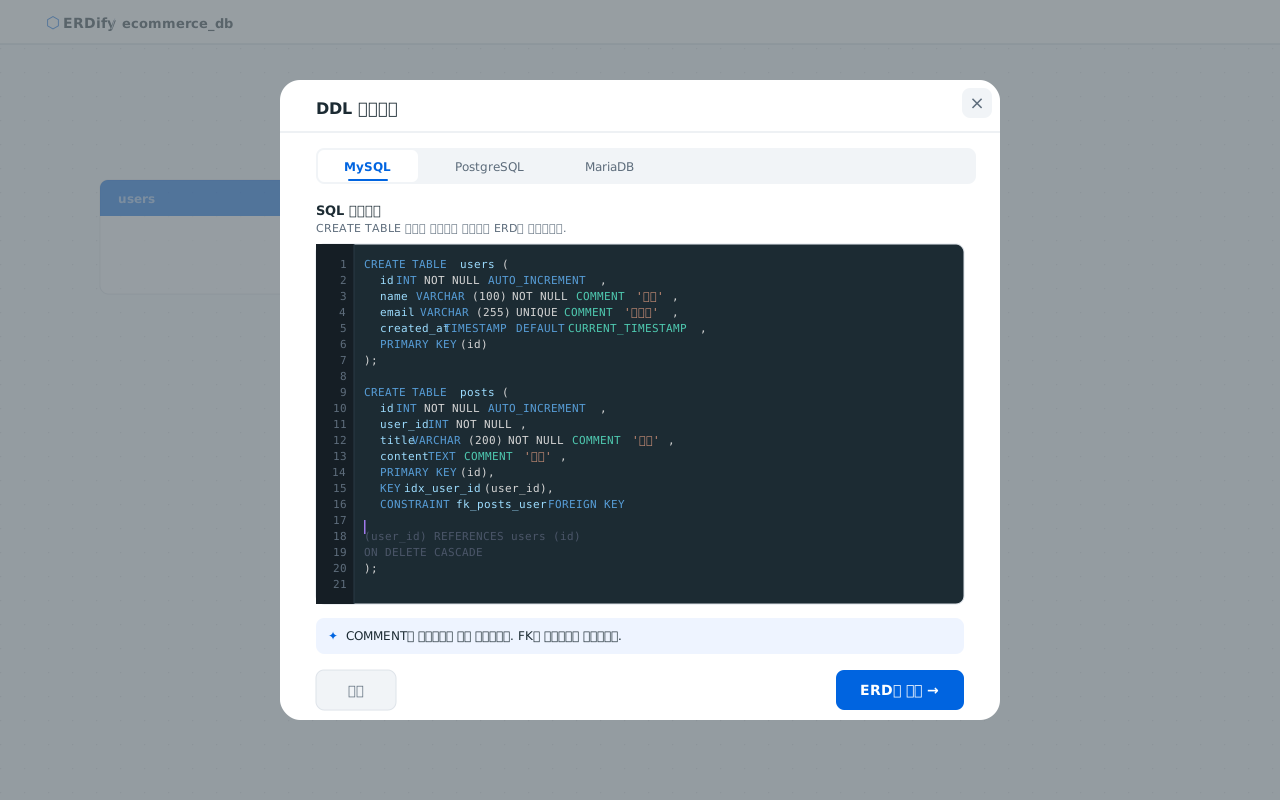
MySQL, PostgreSQL, MariaDB DDL을 그대로 붙여넣으면 자동으로 ERD가 생성됩니다. COMMENT도 논리명으로 자동 매핑.
ERD에서 TypeORM, Prisma, SQLAlchemy 코드를 바로 내보냅니다. 반복 작업을 줄여드립니다.
변경 이력을 자동으로 기록합니다. 언제든 이전 버전으로 되돌릴 수 있습니다.
읽기 전용 링크로 팀 외부와 공유하세요. 만료 시간을 설정해 보안을 유지합니다.
스키마별로 테이블 헤더와 미니맵에 색상을 자동 적용합니다. 대규모 ERD에서도 구조를 한눈에 파악하세요.
Ctrl+F로 테이블·컬럼을 즉시 검색하고 캔버스에서 바로 이동합니다. 수백 개의 테이블도 빠르게 탐색하세요.
터미널에서 ERD를 직접 제어하세요. npm으로 설치하고 API 키 하나로 테이블·컬럼·관계를 스크립트와 CI/CD에서 자동화합니다.
AI 도구와 MCP로 연결하거나, REST API로 직접 통합하세요.
{
  "mcpServers": {
    "erdify": {
      "command": "npx",
      "args": ["-y", "@erdify/mcp-server@latest"],
      "env": {
        "ERDIFY_API_KEY": "erd_your_api_key_here"
      }
    }
  }
} {
"mcpServers": {
"erdify": {
"command": "npx",
"args": ["-y", "@erdify/mcp-server@latest"],
"env": {
"ERDIFY_API_KEY": "erd_your_api_key_here"
}
}
}
} {
"mcpServers": {
"erdify": {
"command": "npx",
"args": ["-y", "@erdify/mcp-server@latest"],
"env": {
"ERDIFY_API_KEY": "erd_your_api_key_here"
}
}
}
} mcp_servers:
erdify:
command: npx
args:
- -y
- "@erdify/mcp-server@latest"
env:
ERDIFY_API_KEY: erd_your_api_key_here curl https://api.erdify.com/v1/projects/proj_abc/schema \ -H "Authorization: Bearer erd_your_api_key_here"
import { ERDifyClient } from '@erdify/sdk';

const client = new ERDifyClient({ apiKey: 'erd_your_api_key_here' });

const schema = await client.projects.getSchema('proj_abc');
console.log(schema.entities); // 테이블 배열 from erdify import ERDifyClient
client = ERDifyClient(api_key="erd_your_api_key_here")
schema = client.projects.get_schema("proj_abc")
print(schema.entities) # 테이블 목록 curl -X POST https://api.erdify.com/v1/projects/proj_abc/entities \
-H "Authorization: Bearer erd_your_api_key_here" \
-H "Content-Type: application/json" \
-d '{
"name": "orders",
"columns": [
{ "name": "id", "type": "INT", "primaryKey": true },
{ "name": "user_id", "type": "INT" },
{ "name": "total", "type": "DECIMAL(10,2)" },
{ "name": "created_at", "type": "TIMESTAMP" }
]
}' const entity = await client.entities.create('proj_abc', {
name: 'orders',
columns: [
{ name: 'id', type: 'INT', primaryKey: true },
{ name: 'user_id', type: 'INT' },
{ name: 'total', type: 'DECIMAL(10,2)' },
{ name: 'created_at', type: 'TIMESTAMP' },
],
}); entity = client.entities.create("proj_abc", {
"name": "orders",
"columns": [
{"name": "id", "type": "INT", "primaryKey": True},
{"name": "user_id", "type": "INT"},
{"name": "total", "type": "DECIMAL(10,2)"},
{"name": "created_at", "type": "TIMESTAMP"},
],
}) curl "https://api.erdify.com/v1/projects/proj_abc/ddl?dialect=postgresql" \ -H "Authorization: Bearer erd_your_api_key_here"
const ddl = await client.projects.exportDDL('proj_abc', {
  dialect: 'postgresql', // 'mysql' | 'postgresql' | 'mariadb'
});
console.log(ddl); // CREATE TABLE ... ddl = client.projects.export_ddl(
"proj_abc",
dialect="postgresql" # "mysql" | "postgresql" | "mariadb"
)
print(ddl) # CREATE TABLE ... curl https://api.erdify.com/v1/projects \ -H "Authorization: Bearer erd_your_api_key_here"
const projects = await client.projects.list();
console.log(projects); // [{ id, name, updatedAt }, ...] projects = client.projects.list()
print(projects) # [{"id": ..., "name": ..., "updatedAt": ...}, ...] # 설치 npm install -g @erdify/cli erdify login --key erd_your_api_key_here # 조회 erdify list orgs erdify list projects <orgId> erdify get diagram <diagramId> erdify get ddl <diagramId> # 수정 erdify add table <diagramId> users erdify add column <diagramId> <tableId> id --type uuid --pk --not-null erdify add column <diagramId> <tableId> email --type varchar --not-null --unique erdify add rel <diagramId> <srcTableId> <tgtTableId> one-to-many
복잡한 ERD도 쉽고 빠르게 편집하세요.
베타 서비스 기간 동안 제한 없이 사용하세요.
회원가입만 하면 모든 기능을 바로 사용할 수 있습니다.